
Chapter 4. Document structure
Version 2.0 (16 May 2008). Links updated 12 July 2016.
4.1 Introduction: The structure of the manuscript vs. the structure of the work
Viewed as physical objects, rather
than as vehicles for texts, manuscripts have a certain structural
hierarchy. What is regarded as a single manuscript may in fact
comprise more than one volume; Flateyjarbók, for example, is
bound in two volumes, and the large rímur codex Acc. 22 in
three. A manuscript book is made up of quires or gatherings, each of
which contains a number of leaves, normally eight. Each leaf has a
recto side and a verso side, and each side may be further divided
into columns. The text is then written in lines across the page or
column. In order to be able to locate a word quickly and easily, all,
or at least most, of these structural divisions must be registered.
We need to know that a given word appears in the fifth line of the
right-hand or b column on the recto side of folio 34. As it is
customary to foliate manuscripts without regard to their quire
division, the quires will not normally need to be included in the
hierarchical structure, but since the quiring can have implications
for the text itself this division should be indicated, and will also
generally form part of the
element, found in
the document header.<msDesc>
At the same time, of course, manuscripts obviously do contain texts, which is the reason why most of us are interested in them in the first place. A single manuscript will often contain more than one work, each of which may, in the case of lengthy prose works such as sagas, be divided into chapters or sections. In the case of poetry, rímur for example, a single work (rímnaflokkur) will usually consist of several cantos or fits, each containing a number of stanzas, made up of a number of lines. It may be necessary to group these lines in some other ways as well. The stanzas comprising the mansöngur should be distinguished from the main body of the fit, for example, while to facilitate certain types of metrical analysis it might be desirable to divide the individual stanzas into couplets. Some types of poetry, such as the vikivakakvæði, will have a refrain or burden, which should ideally also be distinguished from the narrative section(s) of the stanza.
XML has at its foundation the notion of a text as a single hierarchical structure, which means that it does not work well where there are several concurrent hierarchies, as is obviously the case when one wishes for example to indicate the line divisions both in a poem and in the manuscript in which the poem is contained. The TEI Guidelines offer various solutions to this problem, enabling both the structure of the document and the structure of the text to be encoded.
4.1.1 Hierarchical divisions
The principal means of representing
hierarchy is the
(i.e. “division”) element. <div>
elements may freely nest within each other. The <div>
element
has, in addition to the universally available <div>
and @id
attributes, a
@n
attribute, which specifies the name conventionally given to the
level of division, e.g. @type
, "chapter"
, "stanza"
, if attempting
to represent the structure of the text, "couplet"
, "page"
, "column"
if
the physical structure of the manuscript is to be preferred. It will
be convenient to specify a value for the "line"
attribute in the
@type
element at least each time a change of level occurs. The
software, however, will keep count of the levels of nesting even if
the type attribute is not used.<div>
The complex structure of a work
such as a set of rímur could be represented by using four
levels of
elements, <div>
for the
cantos or fits, <div type="canto">
for the parts (for example
the mansöngvar), <div type="part">
for the stanzas, and
<div type="stanza">
for the lines. If the manuscript being
encoded contains more than one set of rímur, as is frequently
the case, it might be sensible to use <div type="line">
for
each set. A simpler form of mark-up is possible, however. Instead of
<div type="canto">
elements, the tags <div>
(for “line”) and <l>
(for “line-group”, i.e. a group of lines functioning as a formal
unit) can be used, reserving the <lg>
element for larger
structural units. The <div>
attribute is then used to identify the
type of unit, e.g. @type
, "stanza"
, like in "couplet"
. Here again the type need only be defined once.
Lines and line-groups can also be numbered and identified using the <lg type="stanza">
and @n
attributes.@id
This type of markup focusses on the
hierarchical structure of the text. The actual physical realisation
of the text is considered of secondary importance – if of importance
at all – when dealing with modern printed literary works: little
significance is attached to the page and line breaks in the various
editions of, say, Orwell's Nineteen Eighty-Four. In some
cases, however, the early editions of Joyce's works, for example,
supervised by the author himself, the physical make-up of the text
can be of great consequence. It may also be necessary to maintain the
pagination and lineation of standard editions of major works, as
these are frequently used in citations in scholarly works. In the
case of chirographically transmitted material, the physical
organisation of the text is more likely to be recognised as being of
importance and in need of encoding. This can be done hierarchically,
as above, using
elements, which are then given the
appropriate <div>
attributes, e.g. @type
, "page"
or "column"
, but it
seems more appropriate to reserve these elements for structural
divisions in the text, while indicating the physical structure of the
document through the use of so-called “milestone” tags, i.e. "line"
, <pb/>
and <cb/>
. These tags make up a separate hierarchy in the file and help to overcome the problem of overlapping structures in the mark-up; see also the discussion in ch. 4.10 below.<lb/>
The rest of this chapter presents how the text may be encoded at higher structural levels than characters and words. Important elements here are the larger divisions of the text, like chapters, paragraphs (with headings), and stanzas. This chapter also presents how pagination and foliation, together with column-breaks and line-breaks, may be encoded. The following TEI elements are presented:
| Elements | Contents |
|---|---|
| Main divisions of the text, |
| division into chapters (multiple levels are encoded by nesting elements), |
| prose paragraphs, |
| line groups and lines, |
| headings, |
| page-, column- and line-breaks. |
4.2 Main divisions of a TEI document
The following presentation is based on ch. 4 “Default Text Structure” of the TEI P5 Guidelines.
A TEI document is always at its
highest level enclosed by the start tag
and the end tag
<TEI>
. Within the </TEI>
element, two other elements
appear in a fixed order, namely the <TEI>
and the
<teiHeader>
elements. Within the <text>
element, the body text
may appear, enclosed in the element <text>
. If the text has
front matter, there will be an element <body>
, placed before
<front>
containing it. Similarly, there may be an element
<body>
, placed after <back>
and containing back matter.
The elements <body>
, <teiHeader>
and <text>
are
required in any TEI-conformant document, while <body>
and
<front>
are optional. This, then, is the basic structure of a
TEI document:<back>
| Elements | Contents |
|---|---|
| The TEI document begins here, |
| the header goes here, |
| the text itself begins here, |
| any front matter goes here, |
| the main body of the text goes here, |
| any back matter goes here, |
| the text ends here, |
| the TEI document ends here. |
4.2.1 Another possible first division of the text: More than one <text> element
The transcriber may want to divide
a document into more than one text. This can be done with
the
element, which should be contained in the top level
<group>
element taking the place of
<text>
in the simpler scheme illustrated above. The following
structure appears:<body>
    <text xml:lang="en">
      <front> ... </front>
        <group>
          <text xml:lang="en">
            <front> ... </front>
            <body> ... </body>
            <back> ... </back>
          </text>
          <text xml:lang="en">
            <front> ... </front>
            <body> ... </body>
            <back> ... </back>
          </text>
        </group>
      <back> ... </back>
    </text>
The main structure of the text, at
the levels of work, first main division, second main division, first
chapter of first main division, second chapter of first main division
and so on, can be encoded in different ways. If the electronic
document consists of more than one work, the
structure
illustrated above is the natural choice. In that case, one would get
multiple sets of further structural divisions, one set within each of
the <group>
elements. If the electronic document is considered
as a single work, and placed in one <body>
element, there will only be a single <text>
element that needs further
divisions.<body>
4.3 Chapters: <div>
Further division of the
block is achieved through <body>
elements, with one
level nesting inside the other as the transcriber moves down through the
hierarchical structure of the text.<div>
4.3.1 Type- and level-specified <div> elements
In a complex document,
elements may be specified by <div>
and @type
attributes. In this example, the three first chapters of a work have been contained in
@n
elements at the same hierarchical level (siblings):<div>
| Elements | Contents |
|---|---|
| Chapter one goes here, |
| chapter two goes here, |
| chapter three goes here (and so on). |
4.3.2 Unspecified <div> elements
It is also possible to use
elements without specifying their type:<div>
| Elements | Contents |
|---|---|
| Chapter one goes here, |
| chapter two goes here, |
| chapter three goes here (and so on). |
4.3.3 Nesting <div> elements
Note that
elements may nest
inside each other. For example, the levels of work,
chapter and then paragraph can be encoded in the following
manner:<div>
| Elements | Contents |
|---|---|
| The whole work starts here, |
| the first subdivision starts here (nested), |
| one paragraph of the subdivision goes here, |
| end of the subdivision, |
| end of the work. |
While
elements may nest as shown here, <div>
elements may not. They must be encoded sequentially, i.e. as siblings.<p>
4.4 Paragraph text: <p>
The basic-level element for prose
text is the paragraph,
. Typically, the deepest level
<p>
element will contain one or more <div>
elements:<p>
| Elements | Contents |
|---|---|
| A new chapter starts here, |
| this contains the heading, |
| first paragraph, |
| second paragraph, |
| third paragraph, |
| the chapter ends here. |
The
element may
appear in other contexts, such as in the <p>
element. It may also contain a number of
other elements, but – as underlined above – it may not
contain other <teiHeader>
elements, i.e. it is not allowed to nest.<p>
4.5 Metrical text: <lg> and <l>
The elements discussed here are defined and explained in ch. 6 “Verse” of the TEI P5 Guidelines.
Texts in verse should be encoded
using
(line group), which in turn contains one or more
<lg>
elements (lines). As with <l>
, <div>
elements
can nest. According to the TEI Guidelines <lg>
is a sibling of,
i.e. at at the same level as, <lg>
, and cannot be contained
within it (unless it appears within a <p>
element).
Example:<q>
| Elements | Contents |
|---|---|
... | A paragraph ends here, |
| a line group starts here, |
| first line, |
| second line, |
| third line, |
| the line group ends here, |
| and a new paragraph starts here. |
Nesting of
elements is
useful for marking up longer poems. When a poem consists of two
levels of line groups one may encode its structure as shown here:<lg>
| Elements | Contents |
|---|---|
| Here a line group on level one begins, a stanza, |
| here a subgroup starts, a couplet, |
| the first line, |
| second line, |
| and here the subgroup ends, the first of the couplets. |
| Here a new subgroup starts, |
| line, |
| line, |
| here the second subgroup ends, |
| and here the level one line group ends. |
The
and <lg>
elements may have
several attributes, among other things for encoding information about
rhyme or other metrical phenomena. See ch. 9.2 of this handbook for a
more detailed presentation of metrical encoding.<l>
Having
and <p>
as siblings can create problems for the encoding of prosimetrum texts, where lines or verse or even whole
poems can appear within prose text, often as part of direct speech. However, rather than including <lg>
directly within the <lg>
element, we recommend inserting the <p>
and <p>
elements within <lg>
elements, using one <div>
for each of them:<div>
| Elements | Contents |
|---|---|
| A chapter opens here, |
| beginning with some prose text, indicated by a |
| The text goes here, |
| and ends here, indicated by the |
| Then a poem begins, indicated by a new |
| with a linegroup (a stanza) |
| containing some lines. |
| The linegroup ends here, |
| and the poem (i.e. the |
| A new piece of prose text begins, indicated by a new |
| The text goes here, |
| and ends here, indicated by the |
| The chapter ends here. |
4.6 Headings: <head>
The element
is used
for containing headings on all levels of the document. If
<head>
is placed at the start of a <head>
element, it
typically contains a chapter heading:<div>
| Elements | Contents |
|---|---|
| Here a chapter begins, |
| its heading, |
| the first paragraph of the chapter, |
| the second paragraph, |
| and here the chapter ends. |
The level of a heading follows
from the enclosing element. A
element within a level
three <head>
element, is a heading for a level three partition
of the text.<div>
An overlap problem may occur when,
as is common in Old Norse manuscripts, headings for chapters are
placed on the same text line as the last words of the preceding
chapter. Graphically, the heading of a following chapter is in fact placed inside the text block of the preceding chapter.
As we would like to place headings at the beginning of
the textual divisions to which they logically belong, we must override
the structure of the layout. One way to do that is to ignore the
heading of the following chapter when transcribing the last lines of
the preceding chapter. When that chapter is closed with an end tag
, we open the next chapter with its start tag
</div>
, go back one or two lines in the manuscript to where the
heading starts and transcribe from there.<div>
It is generally recommended (ch. 4.7 below) that line break elements
are inserted while transcribing the
manuscript. Following that rule, it is obvious that one cannot keep
a single series of line break elements through the intersection
between the chapters in the case of a heading overlap. However, it is
not invalid according to TEI that <lb/>
elements carrying the
same number occur twice. Our recommendation is to use that
possibility: When moving up again to encode the heading of the
following chapter, then assign the actual number of that graphic line
to its <lb/>
element.<lb/>
Consider the following column (line numbers in left margin):
05 ...............................
06 .... these are the last
07 Header for words of
08 chapter two chapter 1.
09 Here begins the text
10 of chapter two .........
11 ..............................
The example would be encoded this way (word tags omitted):
<div>
    <p> .......
      <lb n="6"/> ... these are the last
      <lb n="7"/>words of<lb n="8"/>chapter 1.</p>
</div>
<div>
  <head rend="inline left"><seg><lb n="7"/>Header for<lb n="8"/>
       chapter two</seg></head>
    <p>
      <lb n="9"/>Here begins the text<lb n="10"/>of chapter two ...
      <lb n="11"/> ......
    </p>
</div>
In this case is it important for the processing of the XML document that the
attribute in the @rend
element gives the information that this headline is 'inline', and that it is located on the left side of the column. The element <head>
is used to encapsulate the <seg>
with the words that are on that particular line in the header. It is possible to make XSLT stylesheets to process this kind of encoding, but it is not simple.<lb/>
When double numbering of line breaks
is used in a transcription, one should make sure that any automatic
numbering program that is run on the
elements is set up
not to override manually given numbers.<lb/>
4.7 Page, column and line breaks: <pb/>, <cb/>, <lb/>
4.7.1 Page breaks and column breaks
TEI uses the empty element
to indicate page breaks. This element has an attribute <pb/>
which can be used for the page numbers. As it is customary to
refer to the manuscript leaves, rather than pages, the value of the @n
attribute should indicate front or back pages (recto, verso).
Column breaks, @n
, should also be indicated in manuscripts with two or more columns. Recommended values for the <cb/>
attribute of the @n
element are “A”, “B” and so on. Example:<cb/>
| Elements | Contents |
|---|---|
| Folio one, recto page, begins here, |
| the first column begins here, |
| and the second column begins here. |
| --- | |
| Folio one, verso page, begins here, |
| the first column of the verso page begins here, |
| and the second column begins here. |
Page break information from, for
example, a printed standard edition, can be encoded in addition to
the
tagging that refers to the manuscript itself.
If one for example would like to add page break
information from a standard edition, we recommend using the <pb/>
attribute:@ed
<pb ed="Standard Edition" n="1"/>
4.7.2 Line breaks
Line breaks are also indicated with an empty
element, the
, which is placed at the beginning of a new line
and may be numbered by using the <lb/>
attribute:@n
<lb n="1"/>Line number one begins here.
We recommend that each page, column and line be identified with an element at the very beginning. So for a manuscript with two columns, the three first lines in the first column on the back of the third leaf (folio) would be encoded in this manner:
<pb n="3v"/><cb n="A"/><lb n="1"/>This is the first line.
<lb n="2"/>This is the second line.
<lb n="3"/>This is the third line.
etc.
In other words, there should be as many
elements as there are pages, as many <pb/>
elements as there are columns, and as many <cb/>
elements as there are lines. We strongly discourage the use of the <lb/>
element in the same way as the <lb/>
element in HTML, in which there typically is one <br>
element less than the number of lines (as the <br>
element is inserted between the lines).<br>
We recommend that
is used consistently for indicating the
line breaks of the manuscript itself. One may include more than
one layer of line break encoding, distinguishing them from each another
with the <lb/>
attribute, as shown in ch. 4.7.1 above.@ed
4.8 Punctuation and hyphenation
4.8.1 Punctuation
If a text has been encoded with each word within a
element, we recommend that
punctuation is encoded within <w>
elements. This element permits the same levels of
text representation as the <me:punct>
element, i.e. <w>
, <me:facs>
and <me:dipl>
.
While punctuation on the <me:norm>
and <me:facs>
levels in most cases will be identical,
it is often radically different on the <me:dipl>
level. Here, many dots in the manuscript will simply be
suppressed, while other punctuation marks will be added, including
modern punctuation marks like quotation marks and exclamation marks.
Suppressing a punctuation mark is simply done by leaving the element empty, while any supplied marks
are encoded by adding a new <me:norm>
element in which the <me:punct>
and possibly also the <me:facs>
element will be empty.<me:dipl>
A text transcribed as
ok nu sagdi hann. þat er eigi sva. sem þu segir
on the
level would probably be rendered as<me:dipl>
“Ok nú,” sagði hann, “Þat er eigi svá sem þú segir.”
on the
level, allowing for some variation in
the type of quotation marks and the order of comma or full stop and quotation mark. In a fully marked-up
text, the dot after “sva” would probably be suppressed on the <me:norm>
level,
while quotation marks would be added, and also a comma after “nu”. Finally, the dot after
“hann” would be changed into a comma:<me:norm>
<me:punct>
  <choice>
    <me:dipl></me:dipl>
    <me:norm>"</me:norm>
  </choice>
</me:punct>

<w>
  <choice>
    <me:dipl>ok</me:dipl>
   <me:norm>Ok</me:norm>
  </choice>
</w>

<w>
  <choice>
    <me:dipl>nu</me:dipl>
    <me:norm>nú</me:norm>
  </choice>
</w>

<me:punct>
  <choice>
    <me:dipl></me:dipl>
    <me:norm>,"</me:norm>
  </choice>
</me:punct>

<w>
  <choice>
    <me:dipl>sagdi</me:dipl>
    <me:norm>sagði</me:norm>
  </choice>
</w>

<w>
  <choice>
    <me:dipl>hann</me:dipl>
    <me:norm>hann</me:norm>
  </choice>
</w>

<me:punct>
  <choice>
    <me:dipl>.</me:dipl>
    <me:norm>, "</me:norm>
  </choice>
</me:punct>

<w>
  <choice>
    <me:dipl>þat</me:dipl>
    <me:norm>þat</me:norm>
  </choice>
</w>

<w>
  <choice>
    <me:dipl>er</me:dipl>
    <me:norm>er</me:norm>
  </choice>
</w>

<w>
  <choice>
    <me:dipl>eigi</me:dipl>
    <me:norm>eigi</me:norm>
  </choice>
</w>

<w>
  <choice>
    <me:dipl>sva</me:dipl>
    <me:norm>svá</me:norm>
  </choice>
</w>

<me:punct>
  <choice>
    <me:dipl>.</me:dipl>
    <me:norm></me:norm>
  </choice>
</me:punct>

<w>
  <choice>
    <me:dipl>sem</me:dipl>
    <me:norm>sem</me:norm>
  </choice>
</w>

<w>
  <choice>
    <me:dipl>þu</me:dipl>
    <me:norm>þú</me:norm>
  </choice>
</w>

<w>
  <choice>
    <me:dipl>segir</me:dipl>
    <me:norm>segir</me:norm>
  </choice>
</w>

<me:punct>
  <choice>
    <me:dipl></me:dipl>
    <me:norm>."</me:norm>
  </choice>
</me:punct>
In many cases, a dot should be interpreted as an abbreviation mark rather
than a punctuation mark. In such cases, we recommend that the dot is encoded using the ordinary
full stop in Basic Latin, but that it is placed within the
element. A text transcribed as<am>
nu fann kgr. engan mann þar
on the
level would probably be rendered as<me:facs>
nu fann konongr engan mann þar
on the
level. In a fully marked-up
text, the abbreviationr “kgr.” would be encoded within an <me:dipl>
element,
while it would be expanded into “onon” (or “onun”) on the <am>
level:<me:dipl>
<w>
  <choice>
    <me:facs>nu</me:facs>
    <me:dipl>nu</me:dipl>
  </choice>
</w>

<w>
  <choice>
    <me:facs>fann</me:facs>
    <me:dipl>fann</me:dipl>
  </choice>
</w>

<w>
  <choice>
    <me:facs>kgr<am>.</am></me:facs>
    <me:dipl>k<ex>onon</ex>gr</me:dipl>
  </choice>
</w>

<w>
  <choice>
    <me:facs>engan</me:facs>
    <me:dipl>engan</me:dipl>
  </choice>
</w>

<w>
  <choice>
    <me:facs>mann</me:facs>
    <me:dipl>mann</me:dipl>
  </choice>
</w>

<w>
  <choice>
    <me:facs>þar</me:facs>
    <me:dipl>þar</me:dipl>
  </choice>
</w>

<me:punct>
  <choice>
    <me:facs></me:facs>
    <me:dipl>.</me:dipl>
  </choice>
</me:punct>
In some cases, a word abbreviated with a dot may occur at the end of a sentence, e.g.
nu fann hann eigi kgr.
This dot would be interpreted as an abbreviation mark and possibly also as a punctuation mark.
On the
level it would be encoded as no more than a dot, while on the
<me:facs>
level it would be suppressed when “kgr.” had been expanded to “konongr”.
The encoder might, however, add a dot as a punctuation mark within a
<me:dipl>
element. That would certainly be the case on the <me:punct>
level, possibly
also on the <me:norm>
level:<me:dipl>
<w>
  <choice>
    <me:facs>nu</me:facs>
    <me:dipl>nu</me:dipl>
    <me:norm>Nú</me:norm>
  </choice>
</w>

<w>
  <choice>
    <me:facs>fann</me:facs>
    <me:dipl>fann</me:dipl>
    <me:norm>fann</me:norm>
  </choice>
</w>

<w>
  <choice>
    <me:facs>hann</me:facs>
    <me:dipl>hann</me:dipl>
    <me:norm>hann</me:norm>
  </choice>
</w>

<w>
  <choice>
    <me:facs>eigi</me:facs>
    <me:dipl>eigi</me:dipl>
    <me:norm>eigi</me:norm>
  </choice>
</w>

<w>
  <choice>
    <me:facs>kgr<am>.</am></me:facs>
    <me:dipl>k<ex>onon</ex>gr</me:dipl>
    <me:norm>konungr</me:norm>
  </choice>
</w>

<me:punct>
  <choice>
    <me:facs></me:facs>
    <me:dipl>.</me:dipl>
    <me:norm>.</me:norm>
  </choice>
</me:punct>
On all three levels, a dot will be displayed after the word “konungr”, but the dot on the
level is
classified as an abbreviation mark (since it occurs within the <me:facs>
element), while the dot on the <am>
and the <me:dipl>
levels is classified as a punctuation mark (since it occurs within the <me:norm>
element).<me:punct>
The dot is by far the most common punctuation mark in Medieval Nordic sources. A question mark was sometimes used, while quotation
marks and exclamation marks are post-medieval and only seen in normalised editions. There are a few additional punctuation marks, e.g.
the punctus elevatus and the virgula. These marks can be encoded using entities,
but should otherwise be kept within the
element. See also ch. 6.3.8 below.<me:punct>
4.8.2 Hyphenation
In medieval manuscripts, hyphens are frequently used at the end of a line to indicate that the word continues on the next line. In such cases, we recommend that the hyphen is entered immediately before the
element. This is what it would look like in a single-level transcription (cf. ch. 3.3):<lb/>
<lb n="1"/>This is an example of how hyphen-
<lb n="2"/>ation can be encoded.
If the hyphen is missing in the manuscript, we suggest that the element
is used to contain the hyphen added by the transcriber:<supplied>
<lb n="1"/>This is an example of how hyphen<supplied>-</supplied>
<lb n="2"/>ation can be encoded.
If the editor wants to display supplied hyphens differently from those found in the manuscript, that can easily be done by a stylesheet.
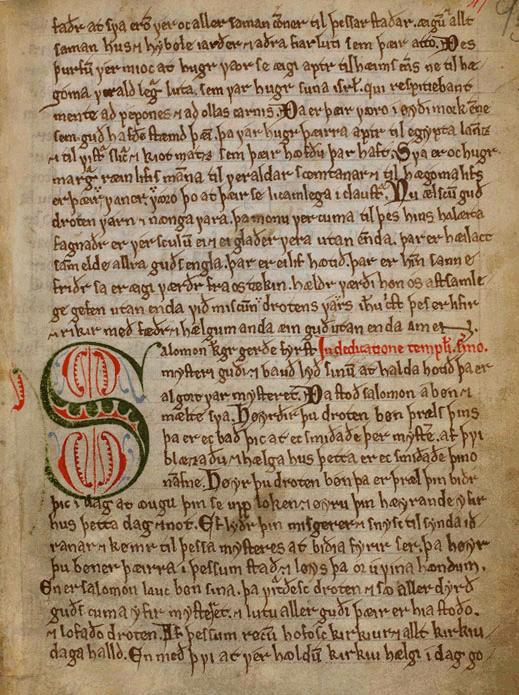
In a multi-level transcription, hyphenation would be contained in the
element. Taking the word “hæ-góma” as an example (from fig. 4.1 below, divided between line 3 and 4), the <me:punct>
element would be placed within each textual level - facsimile, diplomatic and normalised.<me:punct>
<w>
   <choice>
      <me:facs>hæ<me:punct>-</me:punct><lb n="4"/>góma</me:facs>
      <me:dipl>hæ<me:punct>-</me:punct><lb n="4"/>góma</me:dipl>
      <me:norm>hæ<me:punct>-</me:punct><lb n="4"/>góma</me:norm>
   </choice>
</w>
In a display of the facsimile level, hyphens will always be rendered, while they may be suppressed on the diplomatic level, and they will always be suppressed on the normalised level.
If the hyphen does not occur in the manuscript but is supplied by the transcriber or editor, we recommend adding a
attribute with the value @type
:"supplied"
<w>
   <choice>
      <me:facs>hæ<me:punct type="supplied">-</me:punct>
        <lb n="4"/>góma</me:facs>
      <me:dipl>hæ<me:punct type="supplied">-</me:punct>
        <lb n="4"/>góma</me:dipl>
      <me:norm>hæ<me:punct type="supplied">-</me:punct>
        <lb n="4"/>góma</me:norm>
   </choice>
</w>
Note that a single line break will appear several times in a multi-level transcriptions, if it occurs within a word. Great caution must therefore be taken with automatic numbering of
elements.<lb/>
4.9 Initials and highlighted characters
Medieval manuscripts often have initials, sometimes quite large and often decorated in various ways. It is also quite common to find a highlighted capital at the beginning of a section in the text, a littera notabilior. Some transcribers would simply transcribe an initial and a littera notabilior with capitals and refer to a facsimile for the way they have been drawn. Other transcribers would like to encode these traits of the manuscript. For this purpose, we recommend using the
element with a <c>
and a @type
attribute.@rend
| Elements / attributes | Contents |
|---|---|
| contains a character |
| specifies the type of character, e.g. |
| specifies how the character has been rendered in the source |
In fig. 4.1, the last word of line 2 can be encoded as
<c type="littNot" rend="black">Ð</c>es
while the first word of line 16 can be encoded as
<c type="initial" rend="red and green">S</c>alomon
This type of encoding is more relevant for the facsimile and possibly the diplomatic level, but not for the normalised level of text representation.
4.10 Overlapping structures
There are no simple ways of encoding overlapping structures in XML, since XML is a strict tree structure in which every element must be part of a single 'parent' element. For example, a word or sentence may be written over two manuscript pages. If we represent the manuscript page as an element, the words will not belong to a single page and a parser error will occur.
This problem is dealt with in the current chapter by using empty elements to
represent page breaks in the manuscript, rather than a page of text (cf. ch. 4.7 above). The same is
true for columns and lines, where words, sentences and paragraphs routinely
overlap with the physical features of the manuscript. These elements,
, <pb/>
and <cb/>
, are empty in the sense that they are inserted at a specific point in the structure without any extension. For this reason, they are often referred to as milestones. Note the position of the slash in these elements.<lb/>
In ch. 11 “Representation of Primary Sources” in the TEI P5 Guidelines
the elements
, <addSpan/>
and <delSpan/>
are defined. These
elements are counterparts to the elements <damageSpan/>
, <add>
and <del>
, but are all empty,
and should be used when the feature to be encoded crosses structural divisions. There are in fact many more elements which can cross structural divisions, e.g. <damage>
, <sic>
, <corr>
and <unclear>
, but there are no corresponding <supplied>
, <sicSpan>
, <corrSpan>
and <unclearSpan>
. Rather that adding these and several other elements we recommend using one generic empty element to cover all cases of overlapping structures.
We have called this new element <suppliedSpan>
and given it attributes from the classes “att.spanning”,
“att.transcriptional”, “att.typed” and “att.global”, and the attribute <me:textSpan/>
:@me:category
| Elements / attributes | Contents |
|---|---|
| A generic element to handle overlapping text structures |
| Specifies the type of span, restricted to this list of values: |
| for contents that would otherwise be contained by the |
| for contents that would otherwise be contained by the |
| for contents that would otherwise be contained by the |
| for contents that would otherwise be contained by the |
| for contents that would otherwise be contained by the |
| for contents that would otherwise be contained by the |
| for contents that would otherwise be contained by the |
| for contents that would otherwise be contained by the |
| for contents that would otherwise be contained by the |
| for any other contents |
| Specifies the end point of the text span, using values like: |
| anchor 1 |
| anchor 2, etc. |
| An empty element (milestone) which attaches an identifier to a point within a text |
| Specifies the identifier corresponding to the one used in the |
| anchor 1 |
| anchor 2, etc. |
We will discuss an example of an overlapping structure in AM 673 b 4to (Plácitusdrápa 1):
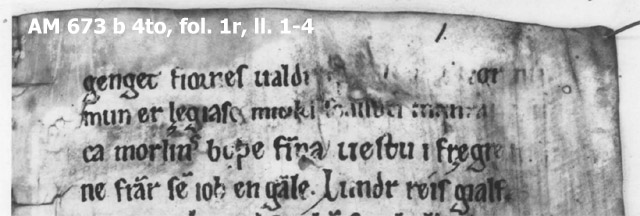
The first three lines read approximately:
genget fiornes ualdr [quaþ........fr]egr nu | mun er lægiasc miuks scalldu manra[un sli] | ca morlins boþe finna uestu i frægre f[rest]
The letters in brackets were read by earlier editors, especially Finnur Jónsson in 1889. For this section, we will discuss the text at the end of the second line and at the start of the third. It is clear that part of each word is missing, but the damaged manuscript forms a single feature. Text can be supplied from Finnur Jónsson’s transcription, but we want to represent both the damage and the supplied text as a single feature, which overlaps with the middle of the two words. The simple encoding, without the unclear text marked or the supplied text, would be:
<w>manra<gap/></w>
<w><gap/><lb n="3"/>ca</w>
With the supplied text encoded in the conventional way, the following would produce an error:
<!-- WRONG: -->
<w>manra<supplied resp="FJ">aun</w>
<!-- the processor stops here because this is not well-formed XML -->
<w>sli</supplied><lb n="3"/>ca</w>
The
and <unclear>
elements, if used in their conventional
way, would overlap with the <supplied>
elements, meaning that the word tag would
close before an element inside it had closed. That would stop an XML
processor from proceding any further with the document.<w>
In these guidelines, we offer two solutions to the problem of overlapping structures. The first is more complex, but more robust. The second is simpler, but is less machine-readable and may affect the validation of the document structure in other respects. Even so, we recommend the latter solution.
4.10.1 Linked segments
The following approach is more sound from the point of view of an XML document, but creates extra tagging. The feature is encoded in a series of separate elements, linked together.
In order to encode linked segments, the encoder should break the
overlapping feature into parts which fit within the XML structure
(usually within the word or dipl/facs/norm elements). Each part is
identified using the
attribute, and they are linked together using
the following attributes:@xml:id
| Elements / attributes | Contents |
|---|---|
| provides a unique identifier for the element bearing the attribute |
| used at the start and in the middle: an IDREF pointing to the element which marks the next tag of the same feature |
| used in the middle and at the end: an IDREF pointing to the element which marks the previous tag of the same feature |
The two-word example above is encoded thus:
<w>man<supplied source="FJ" xml:id="sup1.1" next="sup1.2">raun
     </supplied></w>
<w><supplied xml:id="sup1.2" prev="sup1.1">&slong;li</supplied>
     <lb n="3"/>ca</w>
Adding all three textual levels, including the unclear text encoded at the facs level, we would have:
<w>
  <choice>
    <me:facs>man<unclear xml:id="unc1.1" next="unc1.2">
      <gap extent="8"/></unclear></me:facs>
    <me:dipl>man<supplied source="FJ" xml:id="sup1.1" next="sup1.2">raun
      </supplied></me:dipl>
    <me:norm>manraun</me:norm>
  </choice>
</w>
<w>
  <choice>
    <me:facs><unclear xml:id="unc1.2" prev="unc1.1">&slong;li</unclear>
      <lb n="3"/>ca</me:facs>
    <me:dipl><supplied xml:id="sup1.2" prev="sup1.1">&slong;li</supplied>
      <lb />ca</me:dipl>
    <me:norm>slíka</me:norm>
  </choice>
</w>
It is recommended that the additional information for the feature (such as the editor responsible, type, etc.) be only included in the first element, but editors may wish to include the attributes in all elements.
For the purposes of display, the start of a feature can be marked by selecting the element with the 'next' attribute set, but not the 'prev'; and the end can be marked by selecting the element with the 'prev' attribute set but not the 'next'.
4.10.2 Boundary marking with empty elements
Another solution is to encode the beginning and end of a text span with empty elements. This method has been described in ch. 20 “Non-hierarchical Structures”of the TEI P5 Guidelines and will be applied here in a slightly modified version. As outlined above, we have introduced a generic element
which is specified by way of a <me:textSpan/>
attribute. If, for example, the overlapping structure to be encoded is a piece of supplied text, this fact is expressed through the value of the @category
attribute:@category
<me:textSpan category="supplied"/> Thus, all instances of supplied text in the file will either be contained in
elements (in non-overlapping contexts) or in <supplied>
elements (in overlapping contexts).<me:textSpan category="supplied">
In addition to inserting the empty
element at the beginning of the textual span, an attribute <me:textSpan/>
is added with a suitable index, e.g.@spanTo
<me:textSpan category="supplied" spanTo="an1"/> It now remains to mark the end of the span, i.e. the extent of the supplied text, with another empty element, the TEI
element. This must be specified with an <anchor/>
attribute having the same index as the @xml:id
attribute at the beginning of the span:@me:spanTo
<anchor xml:id="an1"/> The full encoding will be like this:
<w>man<me:textSpan category="supplied" spanTo="an1"/>raun</w>
<w>&slong;li<anchor xml:id="an1"/><lb n="3"/>ca</w>
Note that the value of
attribute must be unique within the whole document.@xml:id
There is no simple answer to the problem of non-hierarchical structures in XML encoding. However, we believe that using empty elements as boundary markers may prove to be the simplest and most general encoding, and it is therefore the solution we recommend. With either technique, only one method should be used in each document.